Ayon
Custom ERP we built for a stainless steel fabrication company. Quotation to collection, used every day since August 2026.
One minute on what changed and how it’s built. Turn the sound on for music.
- 660+
- Purchase orders through approve, order, receive and pay
- 171
- Canvasses, about 1,950 supplier quotes compared line by line
- 700+
- Reusable offcuts tracked by size and location
- 14
- Business modules in one system, plus two phone apps
Screens on this page are from the live system. Customer, supplier and staff names are anonymized; peso values are rescaled.
The Problem
The company already had a workflow. It lived in Excel files, a Viber group chat and a warehouse notebook, and things fell through between the steps. Materials got ordered twice. Steel sheets were ordered by piece count and the leftover pieces weren’t tracked. Checking who still owes meant asking accounting.
We started with purchasing because that’s where most of the time went and where errors cost the most. Each part went live as soon as it was ready. Today the whole office works in Ayon: sales, purchasing, warehouse, production, HR, payroll and accounting.
Before Ayon, and Now
Quotations
Before Quotations in one place, a separate monitoring workbook in another, updated by hand.
Now Quotes, approvals and e-signatures in one place, with a pipeline view.
Sales orders
Before Orders tracked in Excel. Hard to see what was bought and delivered for each one.
Now Each order links to its quote, purchase requests, POs and deliveries.
Purchase requests
Before Requests came from different engineers in different formats.
Now One request per project, approved before purchasing acts on it.
Canvass
Before Not a formal step. Materials got ordered twice, or the wrong item was ordered.
Now A canvass sheet per request: supplier quotes side by side. The same item from several projects is bought once.
Purchase orders
Before POs typed again by hand from the chosen quotes.
Now One prefilled PO per chosen supplier, with approval and payment tracking.
Materials
Before Steel sheets ordered by piece count. Leftover pieces weren’t tracked.
Now A cutting optimizer plans parts onto sheets. Usable offcuts go back to stock.
Warehouse
Before Stock was in a notebook. Hard to tell what was on hand.
Now Every lot has a location. Staff receive, release and count on their phones.
Collections
Before Checking who still owes meant asking accounting.
Now Receivables per sales order, overdue alerts, and a home screen of what needs attention.
Attendance and overtime
Before Biometric exports checked by hand. Overtime requests scrolled from a Viber group chat.
Now Punches pulled from the devices. The system reads the group chat and files each overtime request.
Payroll
Before Computed in Excel workbooks from the attendance exports.
Now Computed from attendance, approved leaves and overtime. Payslips and government reports printed.
One Record, Quote to Collection
Every document points to the one before it and the one after. Pick a step to follow a job through the system.
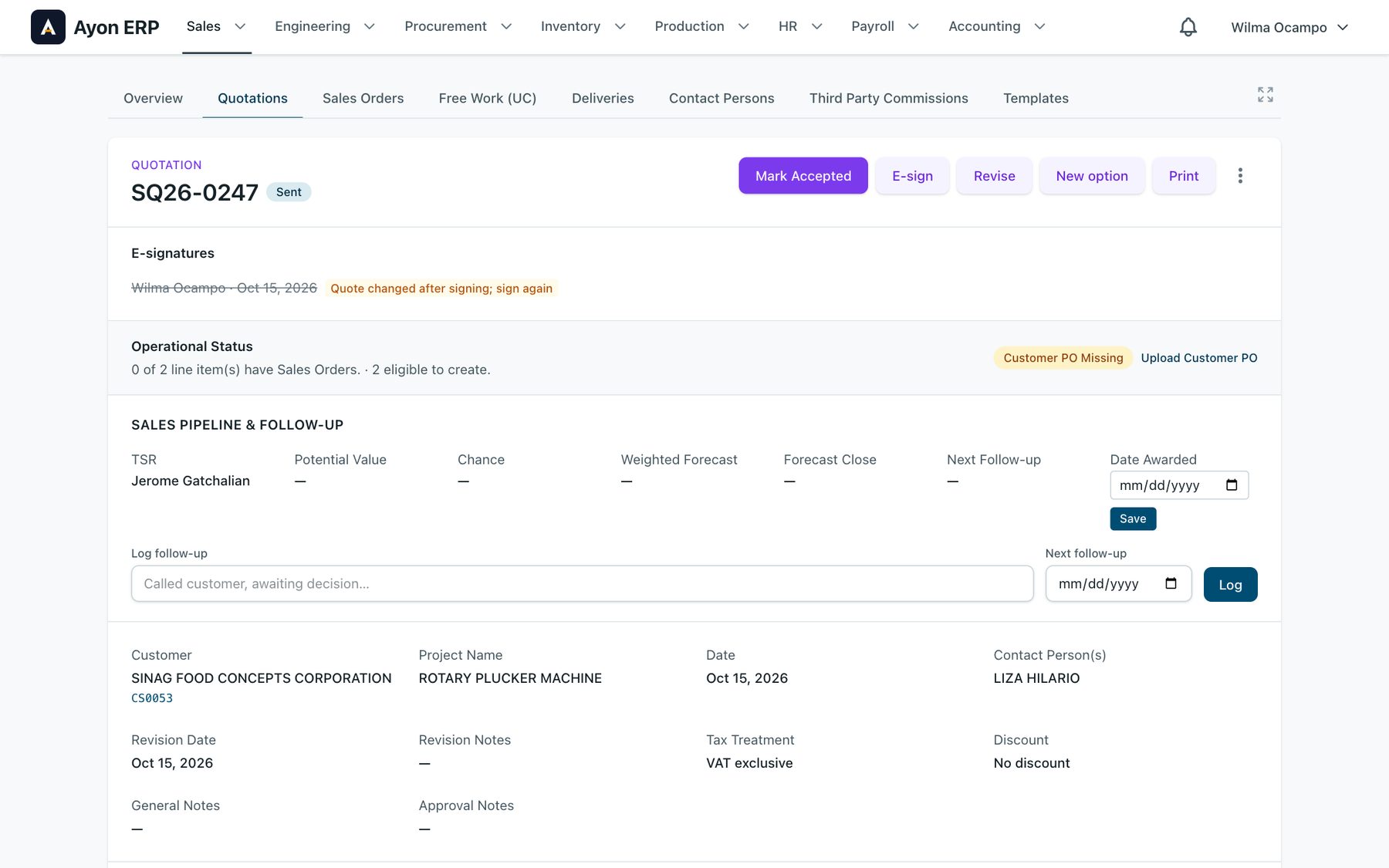
Step 01 of 08
Quotation
Approve, e-sign, revise, add an option, print. If anyone edits a signed quote, the signature is struck out and it has to be signed again.
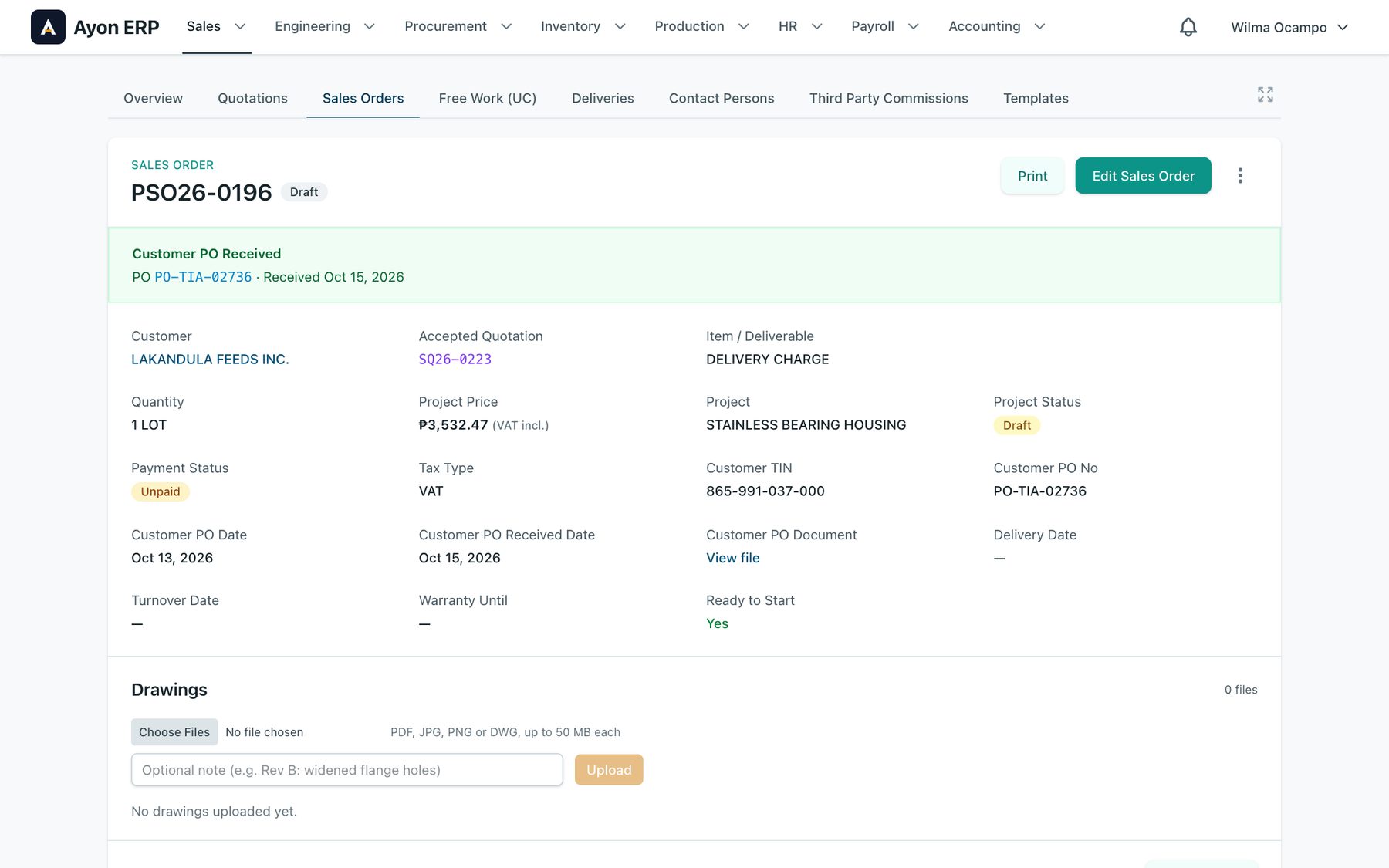
Step 02 of 08
Sales order
Links back to its quotation and forward to its purchase requests, POs and deliveries. A ready-to-start flag tells production the job is clear.
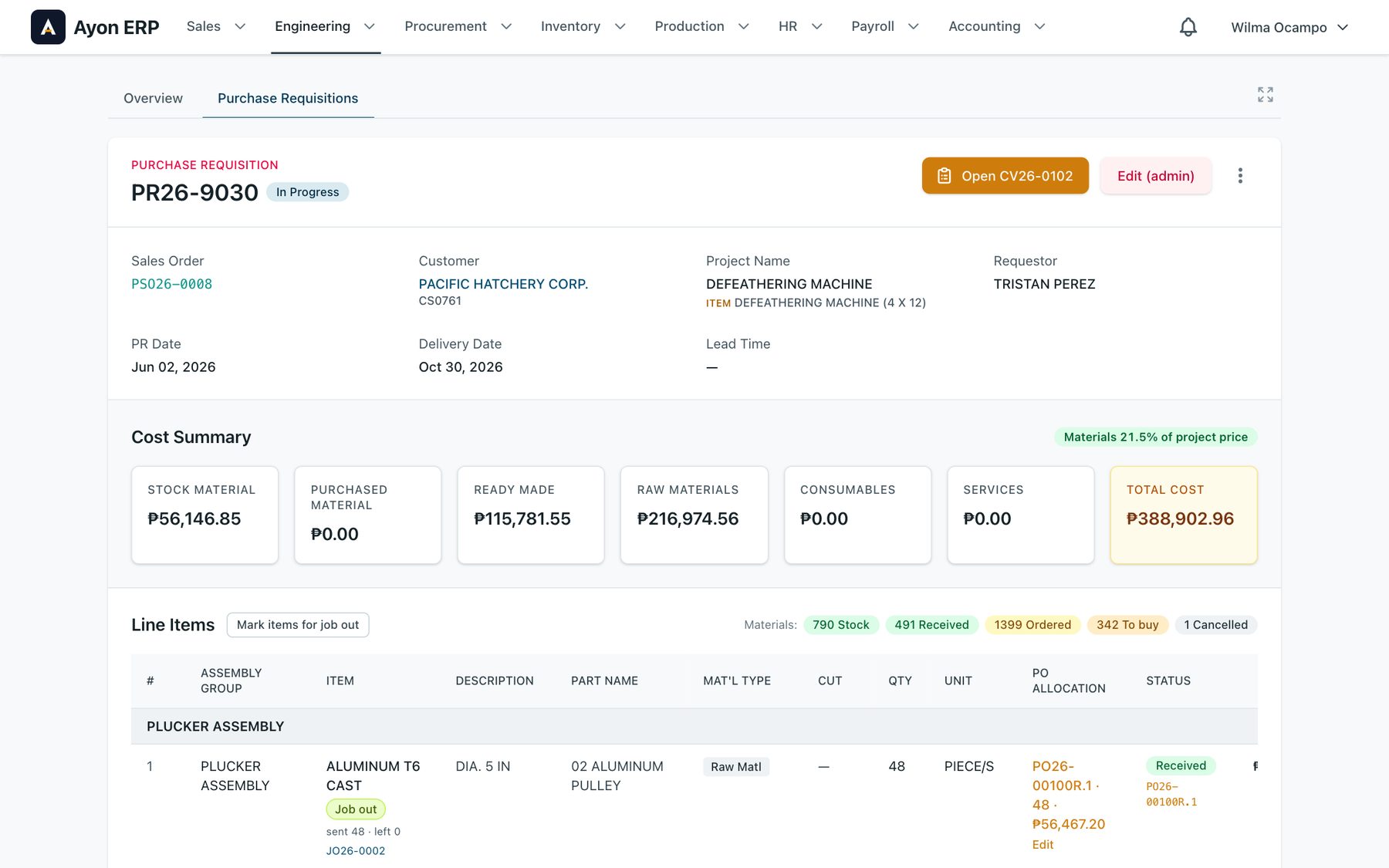
Step 03 of 08
Purchase request
Material demand per project, approved before purchasing acts on it. Each line shows where it went: stock, to buy, ordered, received, job out.
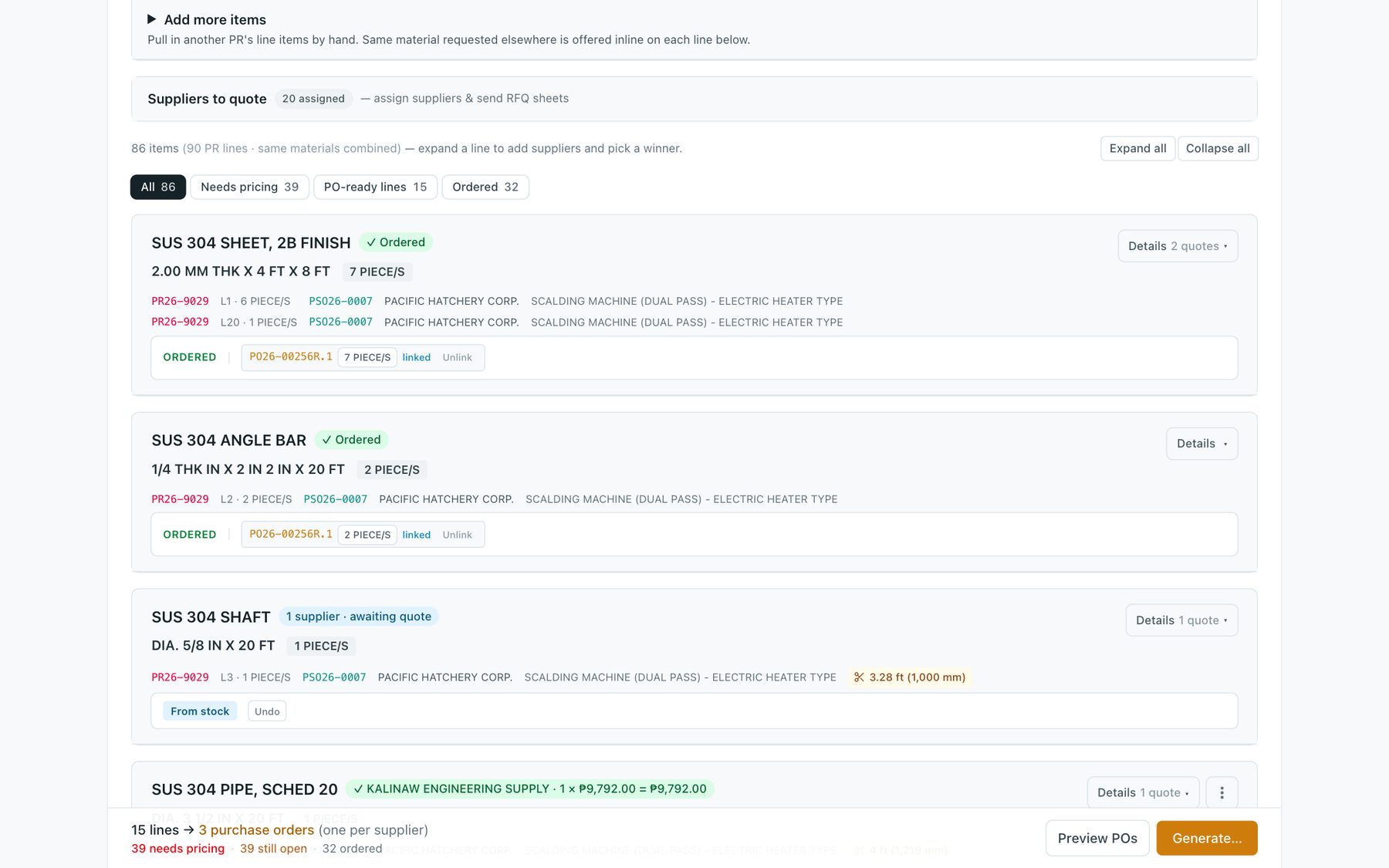
Step 04 of 08
Canvass
Supplier quotes side by side, line by line. Who asked for it, for which order, and whether it’s already in stock.
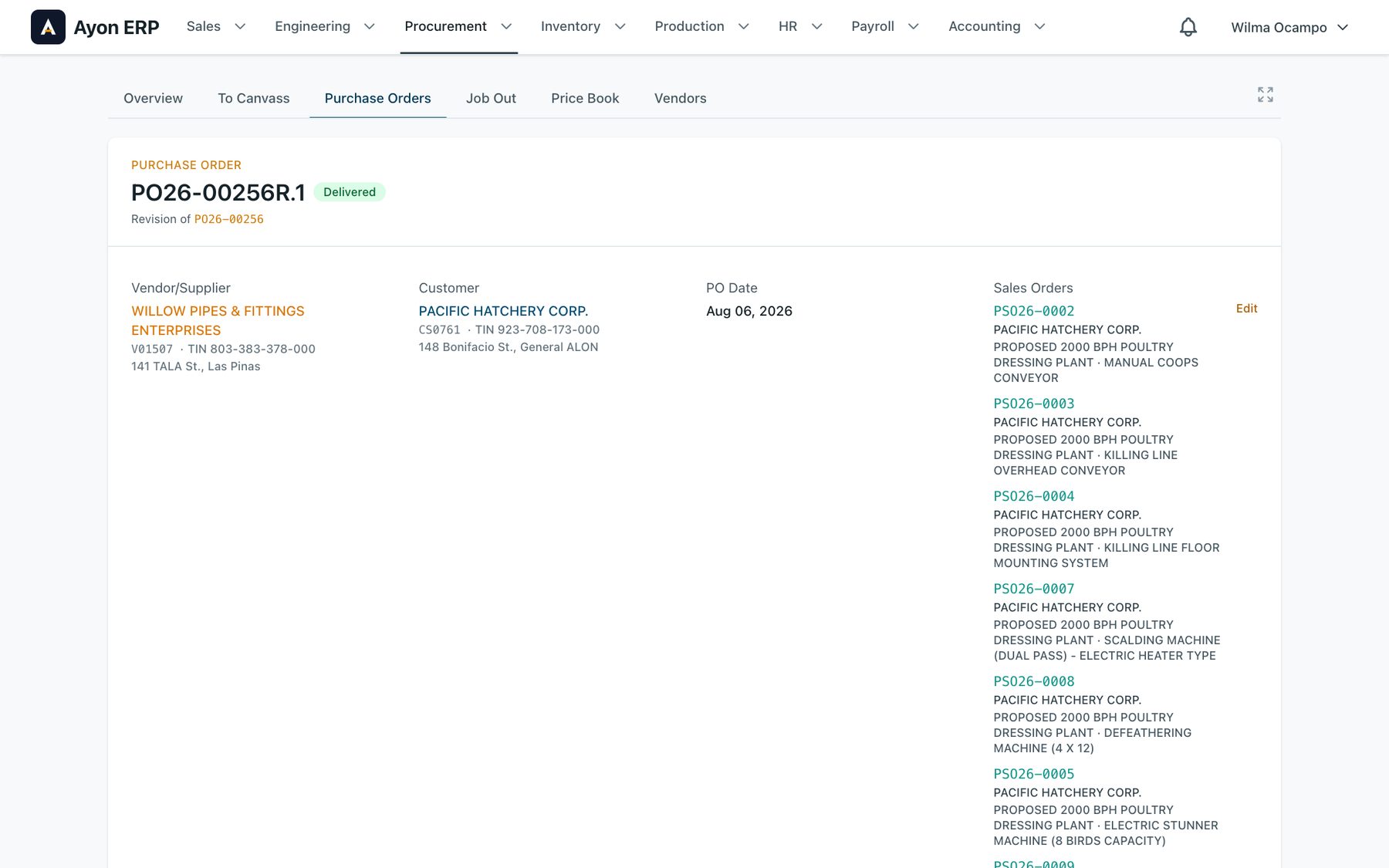
Step 05 of 08
Purchase order
One prefilled PO per chosen supplier. Revisions keep their history. One PO can serve several sales orders.
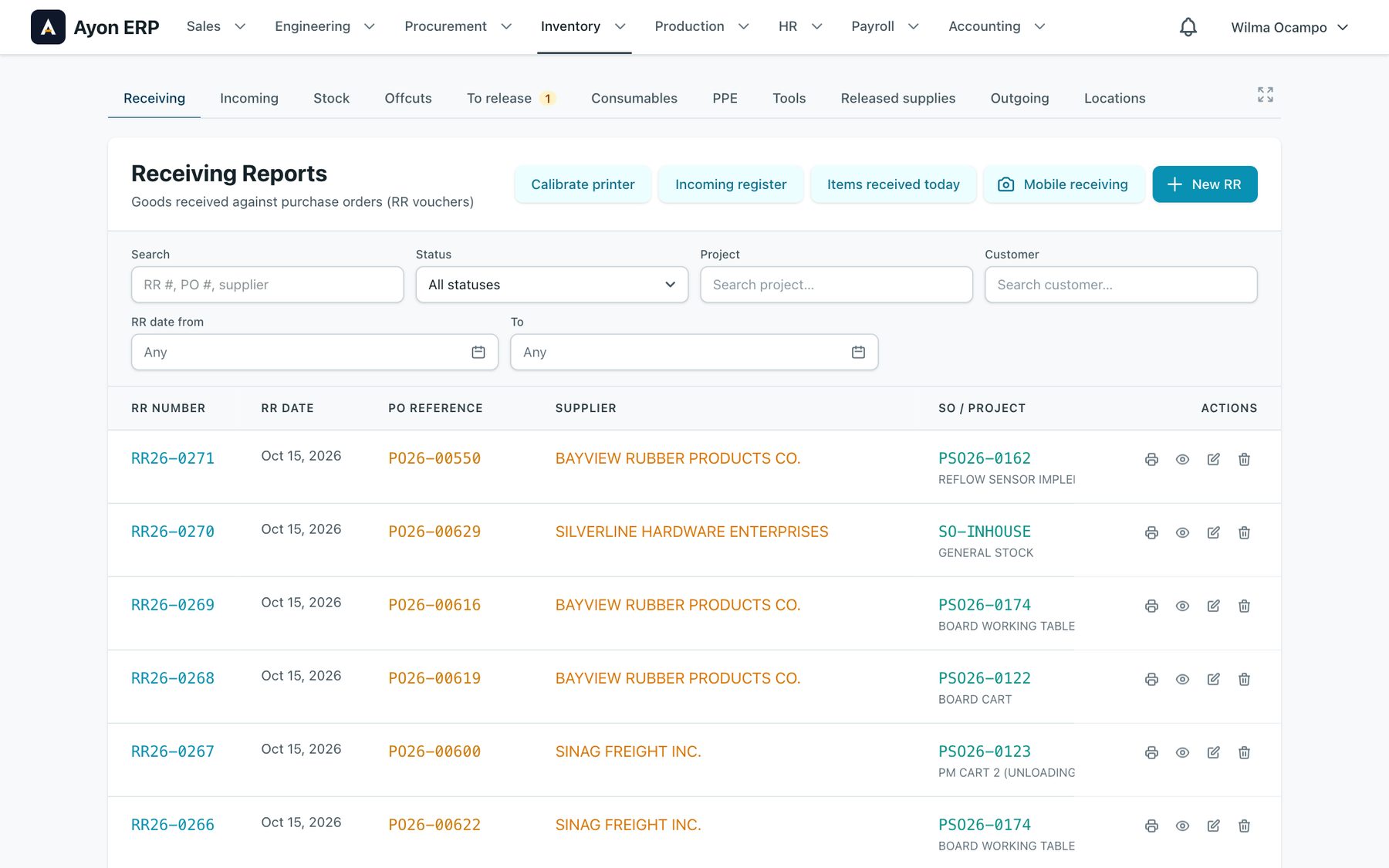
Step 06 of 08
Receiving report
Goods received against the PO line, so short and partial deliveries show up right away. Each item can print a QR tag.
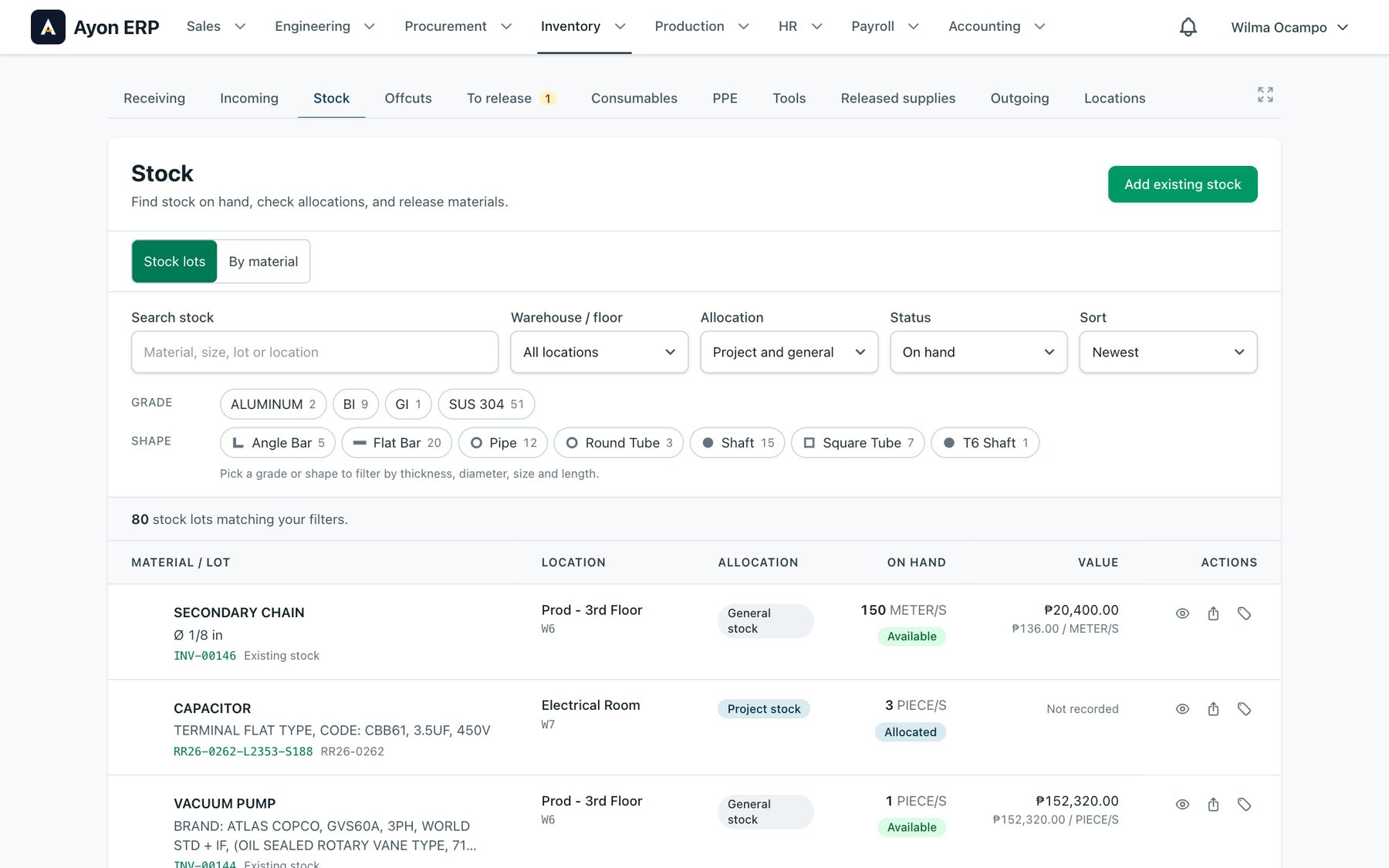
Step 07 of 08
Stock
Every lot with its location, on-hand quantity, value and allocation: general stock, or reserved for a job.
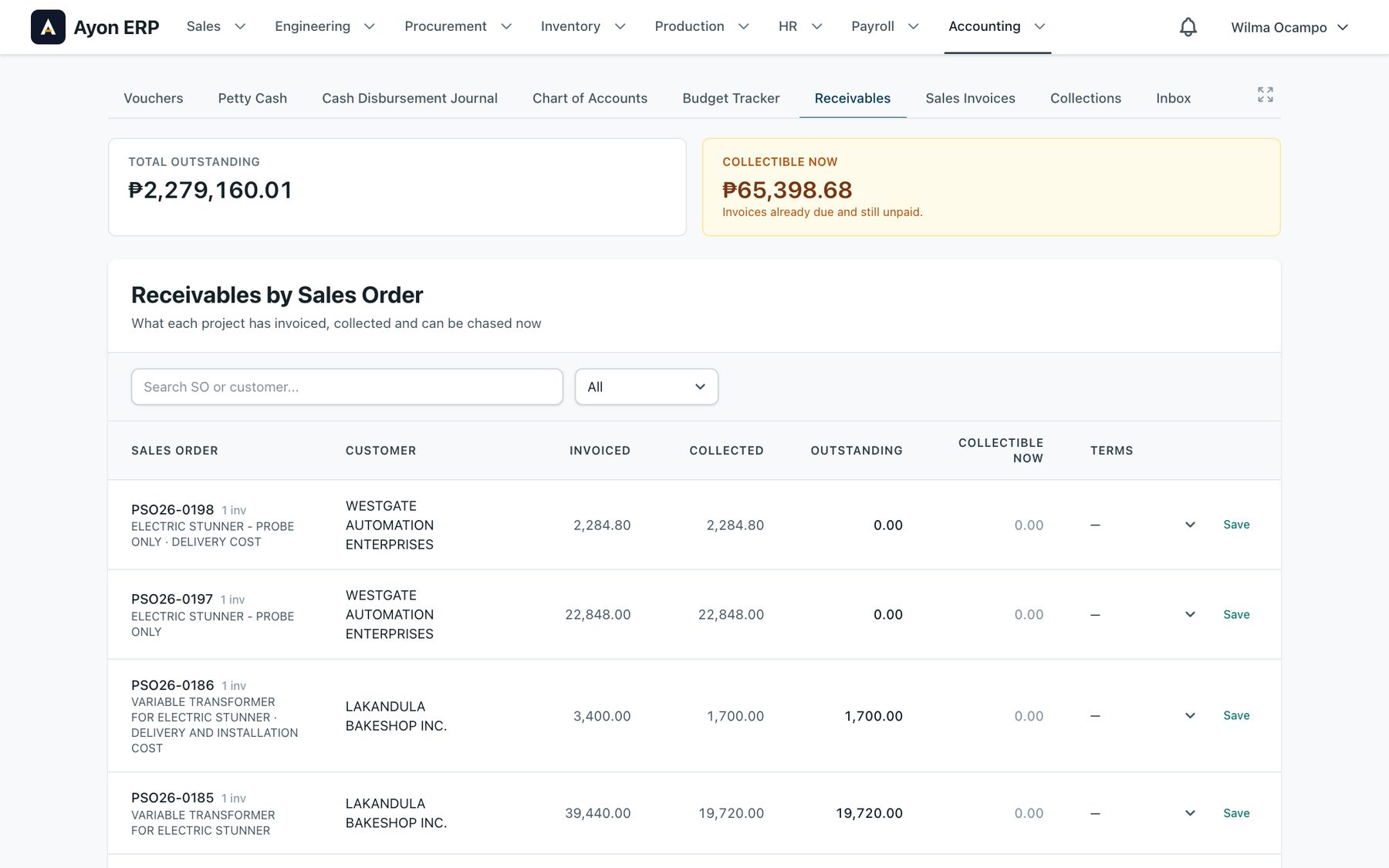
Step 08 of 08
Receivables
Invoiced, collected and outstanding per sales order. Overdue invoices also show up on the home screen.
Canvass Changed the Most
Before, canvassing wasn’t a formal step. It happened between the request and the PO, with purchasing coordinating every supplier and every engineer by hand. Now every request goes through a canvass sheet, and the purchase orders come out of it.
- Work by request, by material, or by supplier, so the same item asked for by several projects is bought once.
- Usual suppliers come preloaded with the last price paid. Print an RFQ sheet per supplier.
- Preview the POs before generating them. Order part now and the rest later.
- Stock and offcuts that fit are offered before you buy. Substitutes go to the approver.
- Buyers see each other’s changes live.
The slowest canvass used to take 37.9 seconds to open. It now opens in 0.56.
Plan the Cuts Before Buying Sheets
They were ordering sheets by piece count. Ayon plans the parts onto standard 4×8 sheets, shows how much of each sheet is used, and puts usable offcuts back into stock for the next job. Try it: change a size or add a part.
Cutting Plan
CV26-0214 · SUS 304 SHEET, 2B FINISH · 1.20 MM THK X 4 FT X 8 FT
| Part | W mm | L mm | Qty | Remove |
|---|---|---|---|---|
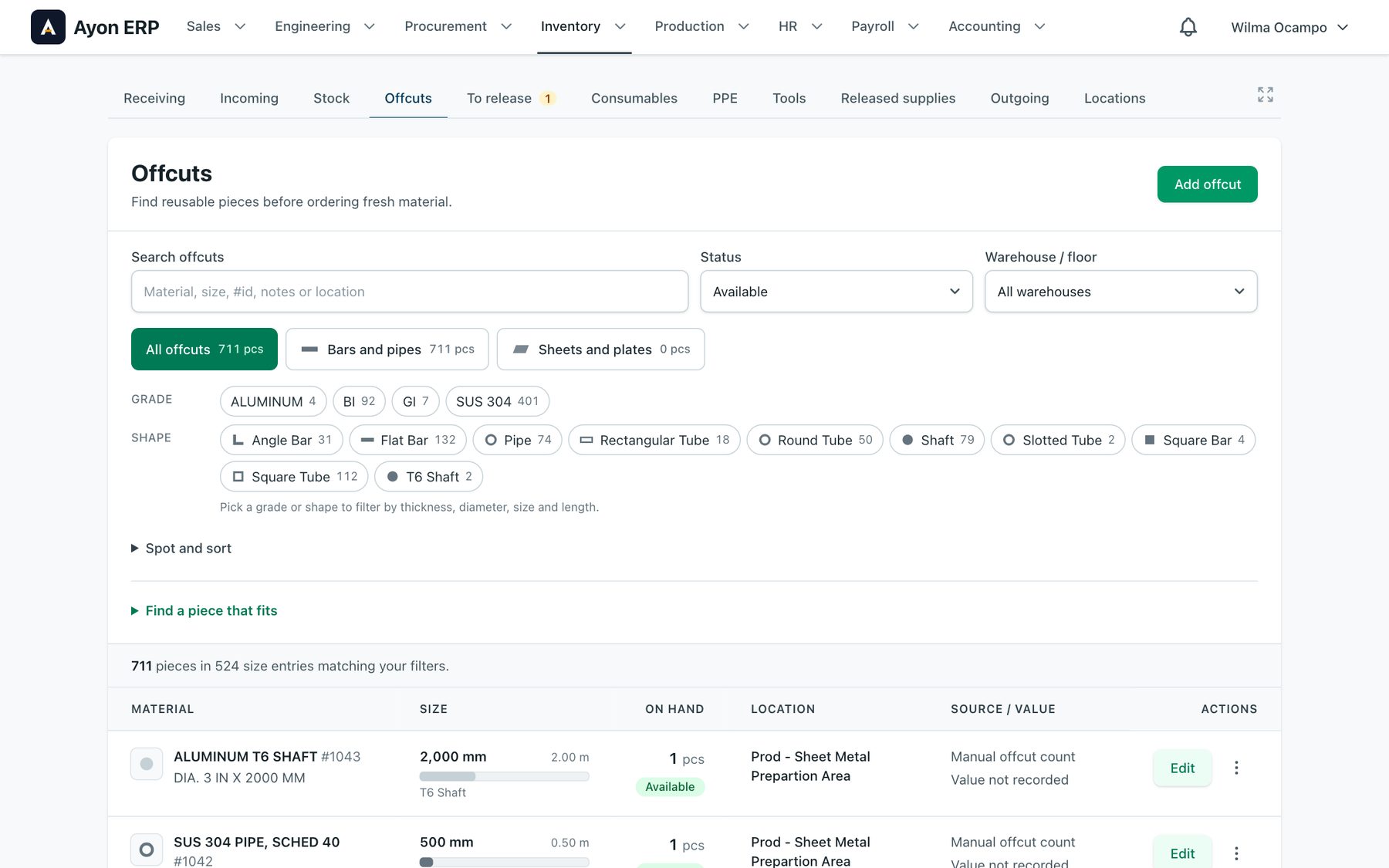
700+ offcuts, each with a place
Every reusable piece has its size, location and status. “Find a piece that fits” takes the size you need and lists the pieces it can be cut from. The canvass offers them before anyone orders new stock.
Phone Apps for the Floor
Warehouse staff aren’t always near a computer when deliveries arrive. The apps install from the browser, no app store needed, and keep working when the signal drops.
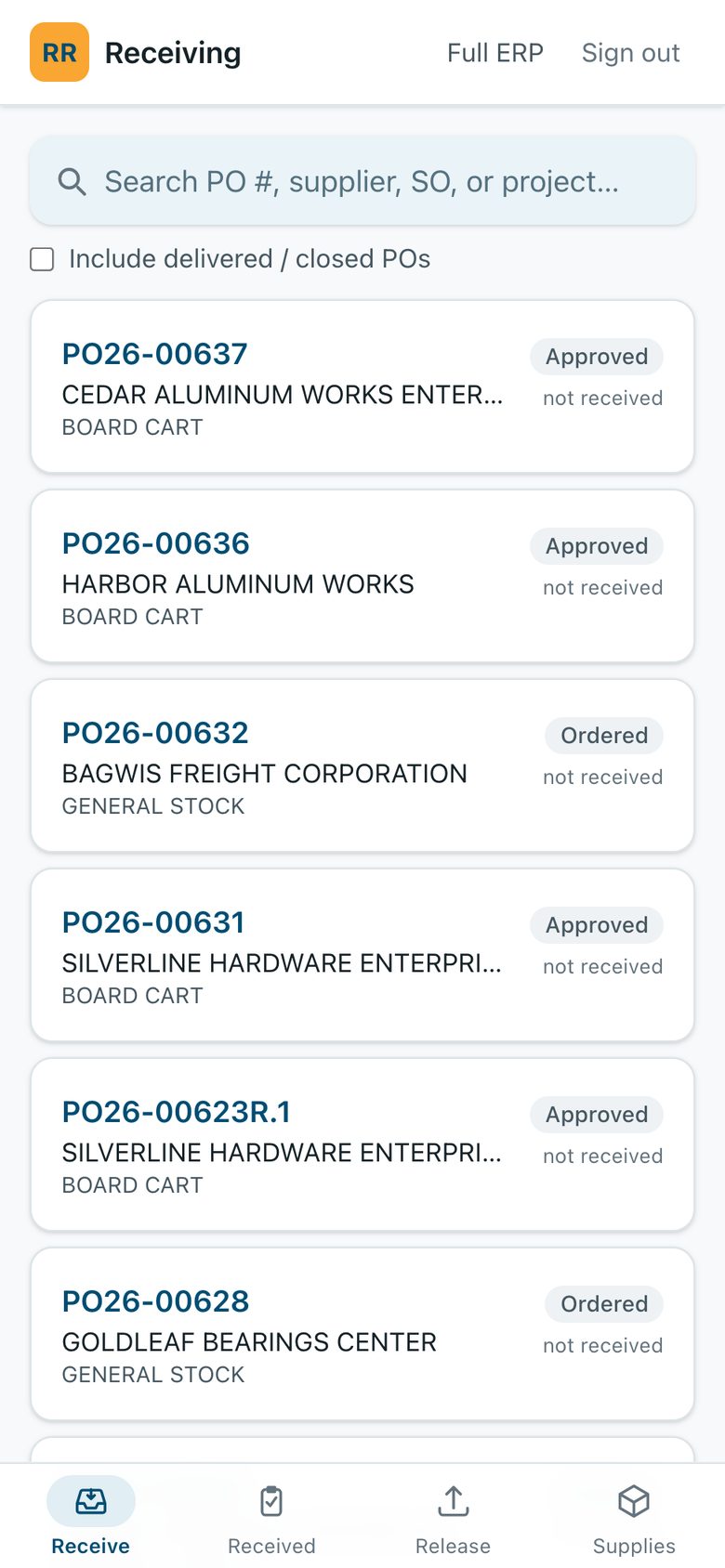
When the truck arrives, open the PO.
Open POs waiting for delivery. Tap one, enter what arrived and its condition, photograph the delivery receipt.
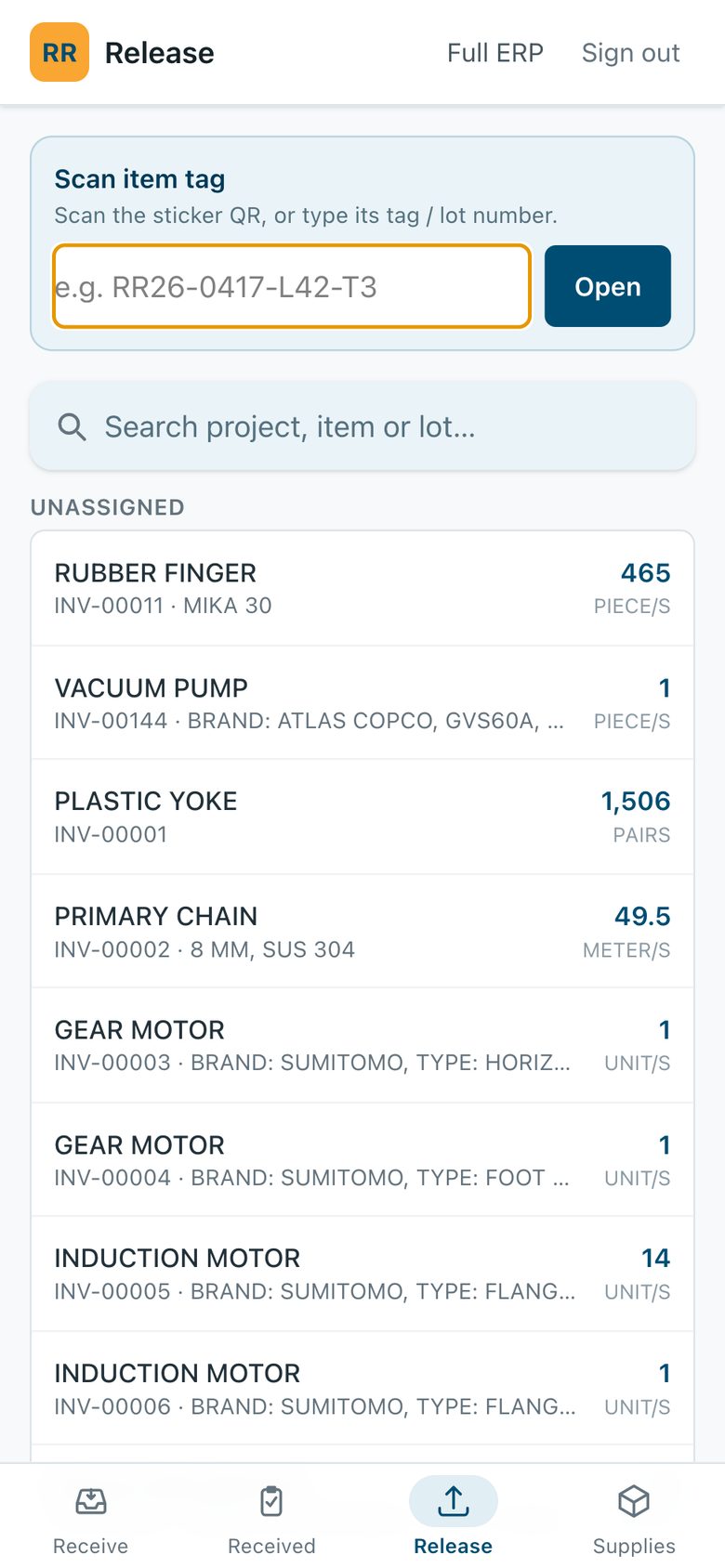
Then scan the tag to release it.
Scan the QR tag on an item, or search, and release it to the job. Stock updates right away.
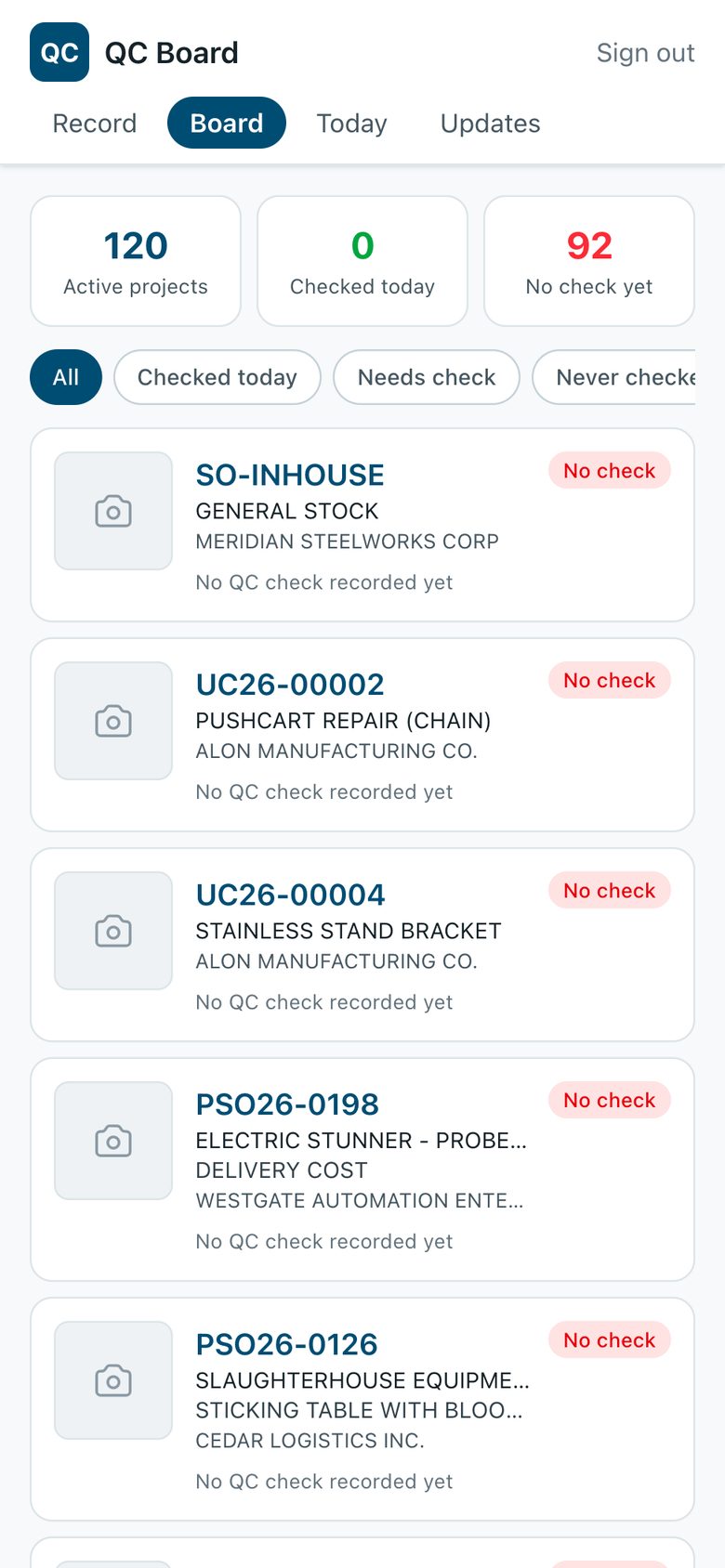
QC sees which jobs need a look.
Every active job with its last check. “Never checked” and “needs check” show where to go next.
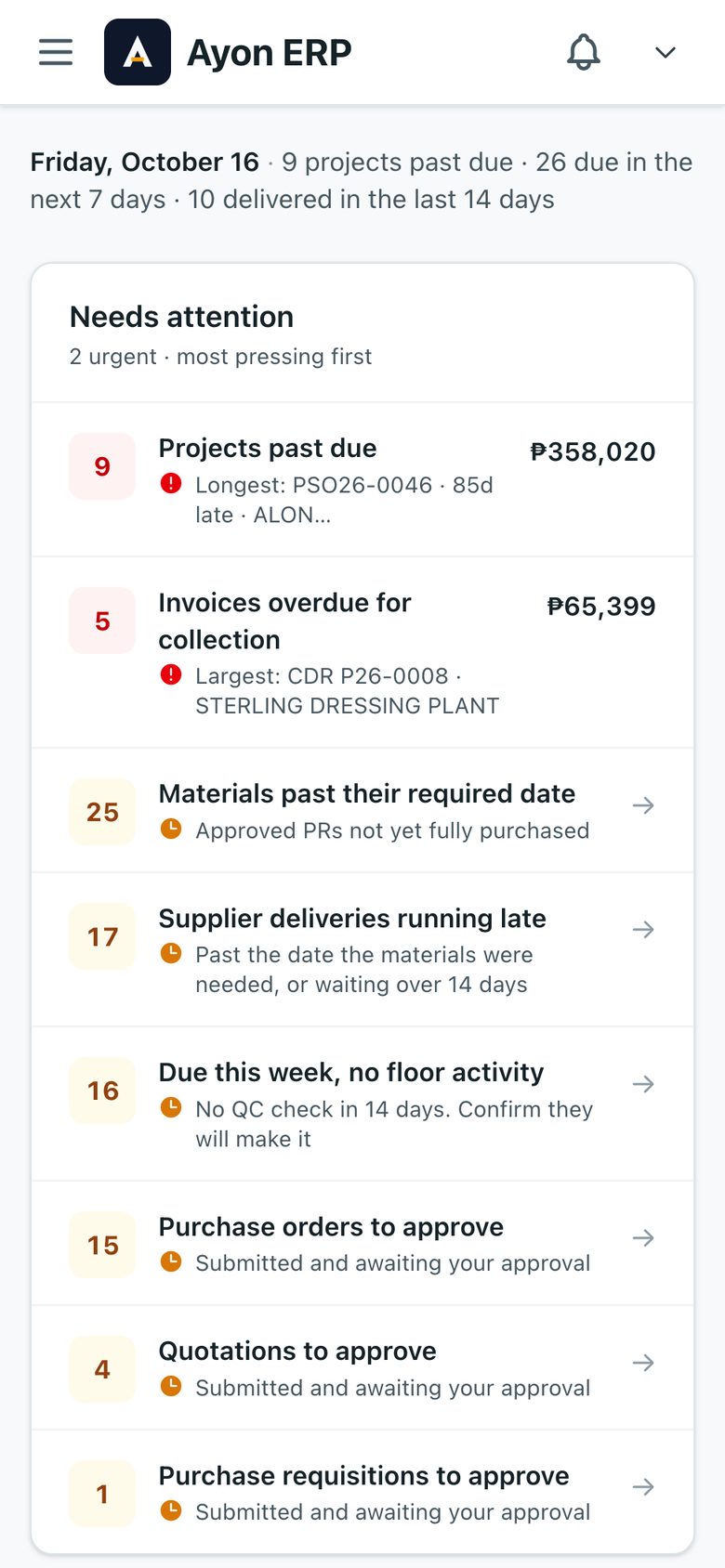
Managers approve from anywhere.
The full system works on a phone. A QC account opens the QC app and nothing else.
It Reads the Group Chat
Staff were already sending overtime requests in a Viber group, so we made the system read the chat instead of asking them to change. Each request becomes a pending entry for HR. Tested on 123 real messages: 26 requests found, none missed.
- Production photos posted in the group come in with a suggested job and stage.
- Payment-proof photos land in the collections inbox with a suggested customer.
- Alerts go out by Viber, email and the in-app bell. Each person picks what they get.
Production OT · 34 members
Regine L.
Good pm po. Request OT po ako hanggang 7:30PM, tatapusin ko yung exhaust hood sa 3F.
4:12 PM
Arvin P.
OT din po hanggang 7PM, welding ng undershelf (PSO26-0188).
4:15 PM
Overtime
2 waiting for approvalLim, Regine
From Viber · Jobsite · until 7:30 PM · 3 h
Pacheco, Arvin
From Viber · Office · until 7:00 PM · 2 h
Core Capabilities
Fourteen modules under eight menus, plus the receiving, release and QC phone apps. Each role sees only its own part.
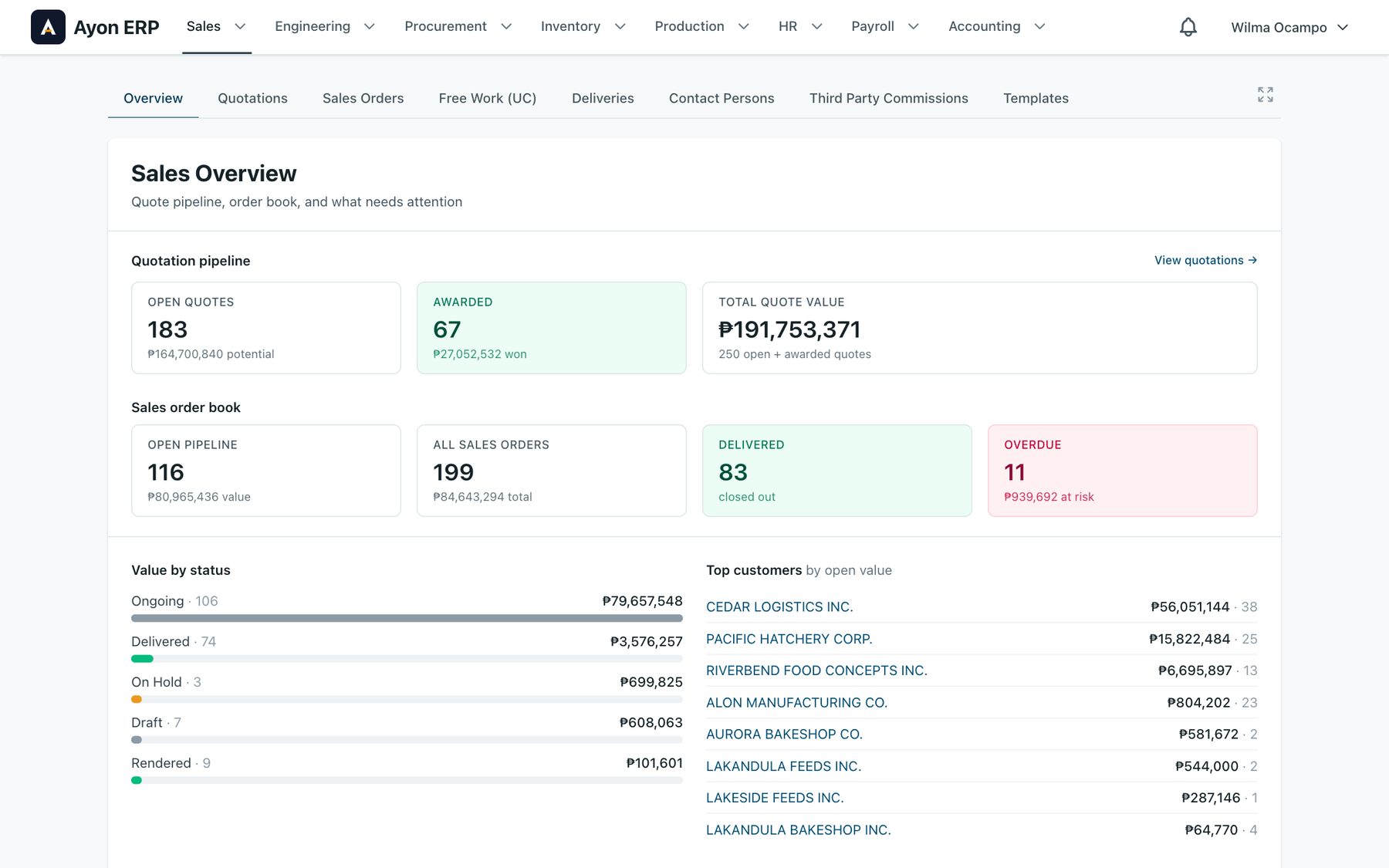
Sales
Quotes, approvals, e-signatures and the order book in one place.
- Quotations with revisions, options, header rows and photos per line
- Approval, e-signature, and a frozen PDF of what the customer got
- Pipeline per quote: chance, forecast, next follow-up
- Sales orders with customer PO, tax type, warranty and drawings
- Deliveries in batches with DR and SI numbers
- Free work orders, contact persons, quotation templates
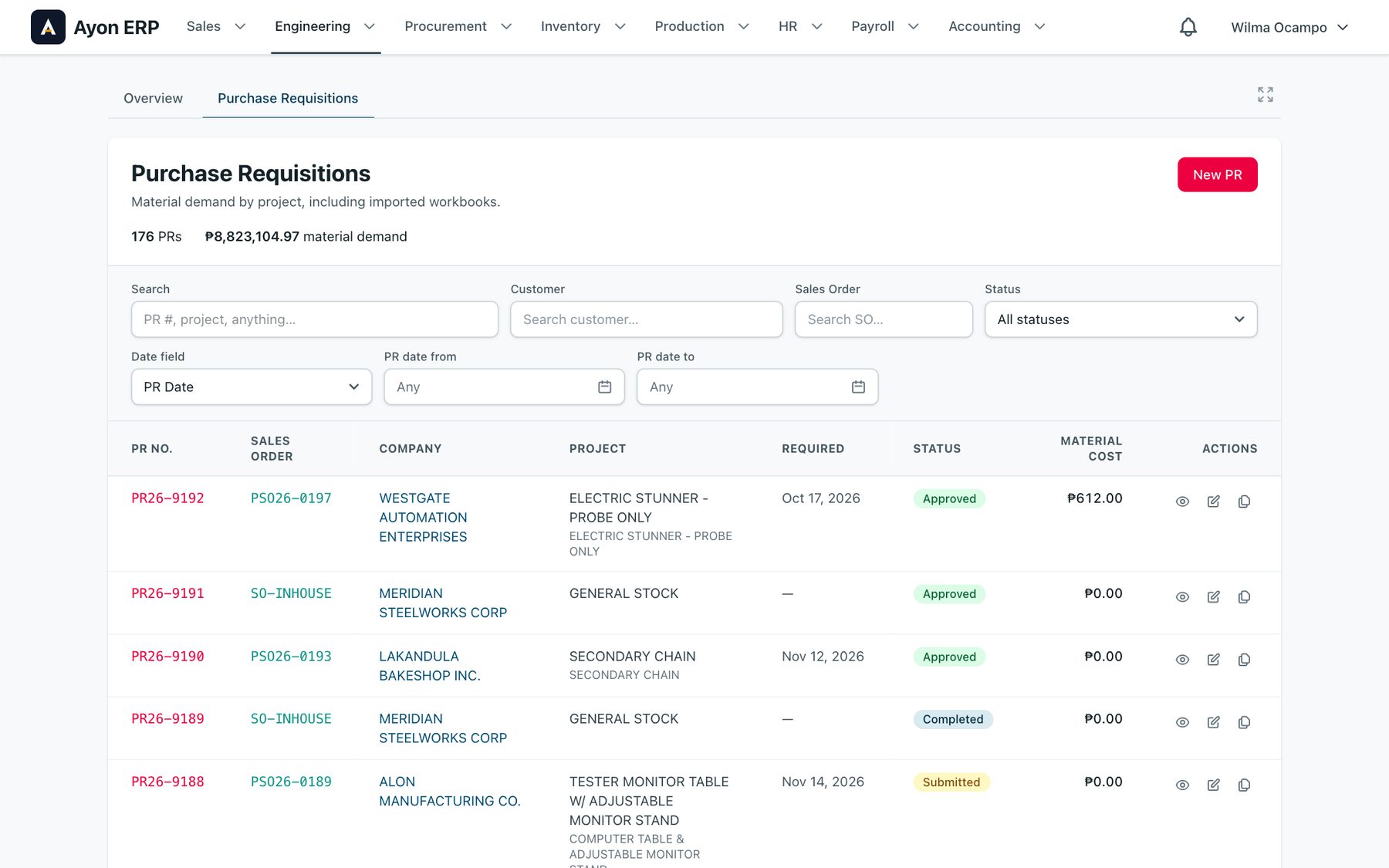
Engineering
Material demand per project, approved before anyone buys.
- Purchase requests grouped by assembly, with cut dimensions
- Cost summary: stock, purchased, raw and ready-made against project price
- Line status from stock to received, with the PO it landed on
- Duplicate a PR, mark lines for job out
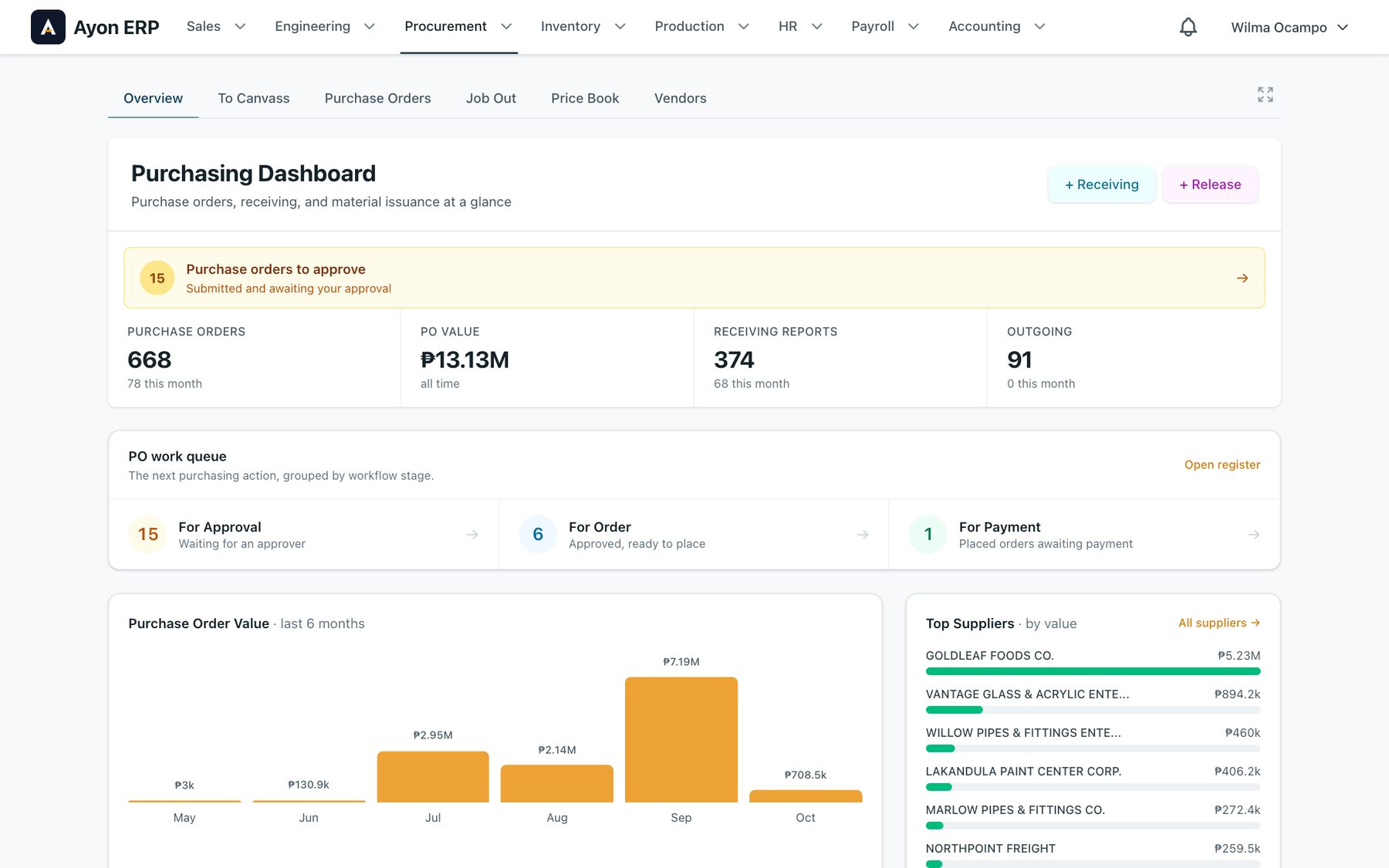
Procurement
From approved request to paid purchase order.
- To canvass worklist by request, by material or by supplier
- Usual suppliers with the last price paid; printable RFQ
- Preview POs before generating; buy part now, the rest later
- Substitutes routed for approval
- PO approval, revisions, payment status, debit memos
- Job out to subcontractors; price book; 4,000+ vendors
- Import POs in USD with landed cost
Inventory
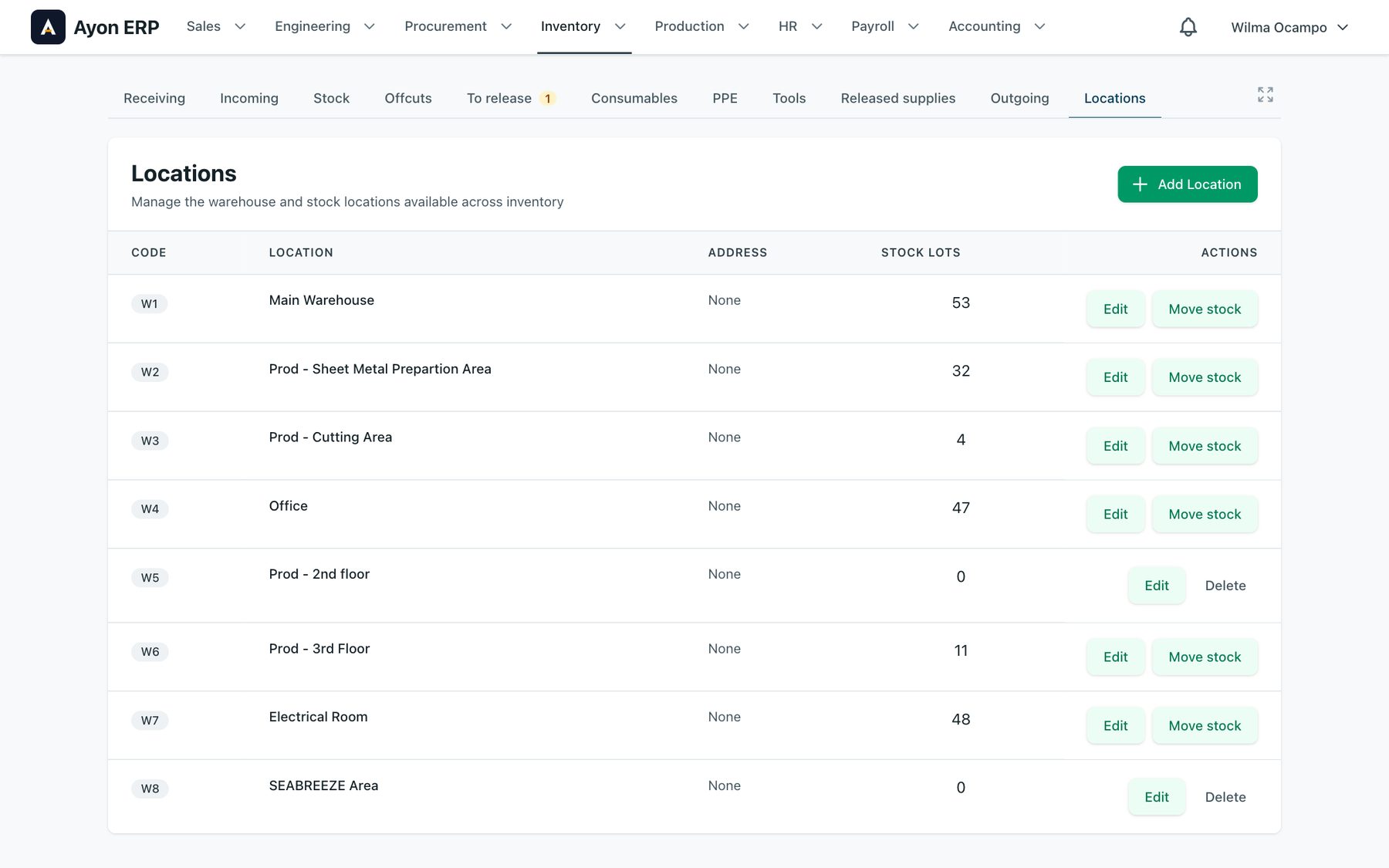
Every lot, offcut and consumable has a place.
- Receiving reports with QR item tags on an A6 label printer
- Stock lots with grade and shape read from the item text
- Offcuts drawn to scale, with “find a piece that fits”
- To release queue, release slips, outgoing slips
- Consumables, PPE and tools checked out per employee
- Locations with racks and bins; counts approved by the head
Production and QC
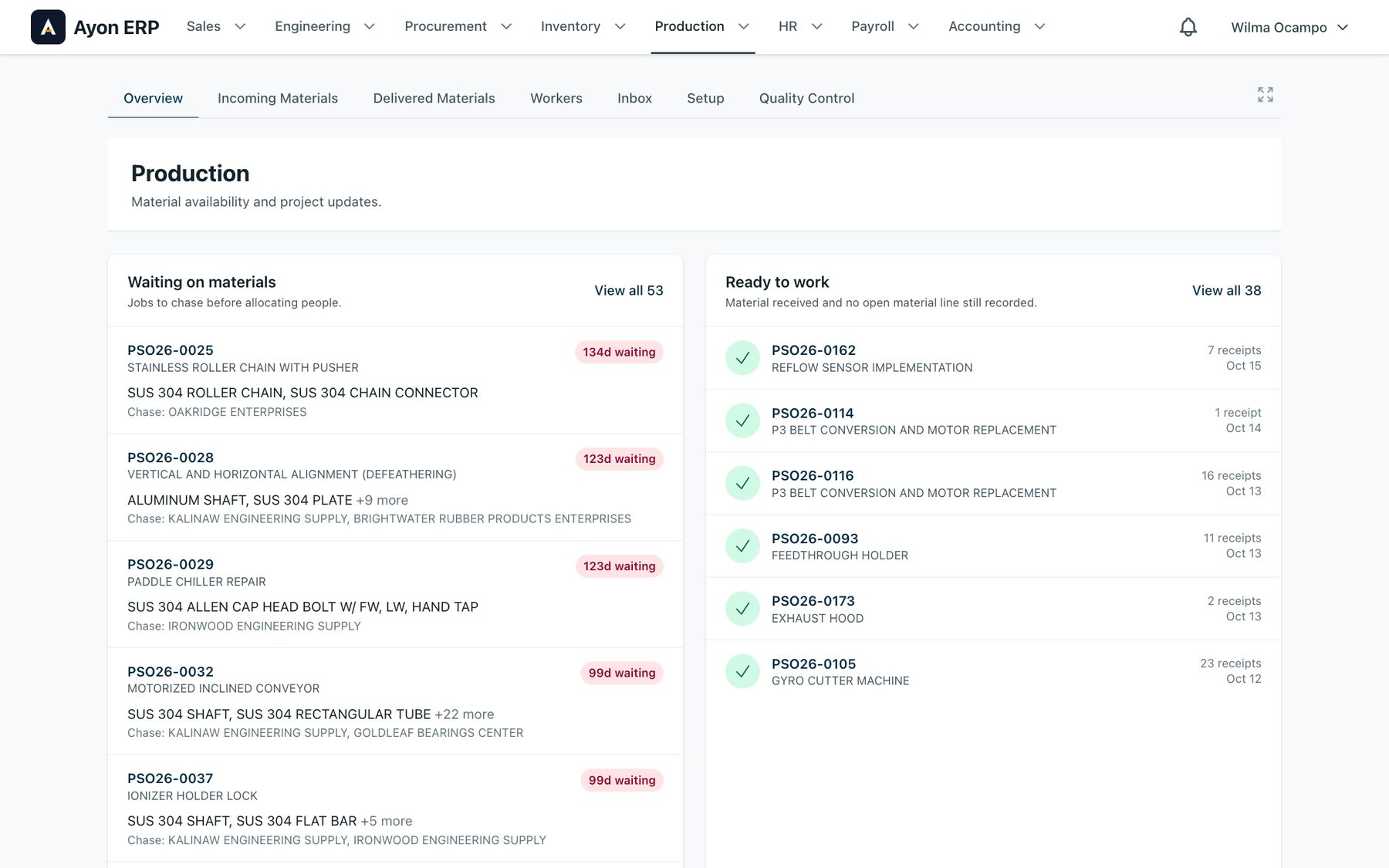
What is ready to work, and what is still waiting on a supplier.
- Jobs waiting on materials, how long, and which supplier to chase
- Incoming and delivered materials per job
- Workers and the steps they did
- QC checks with notes and photos from the phone app
- Photos from the production group chat matched to a job
HR
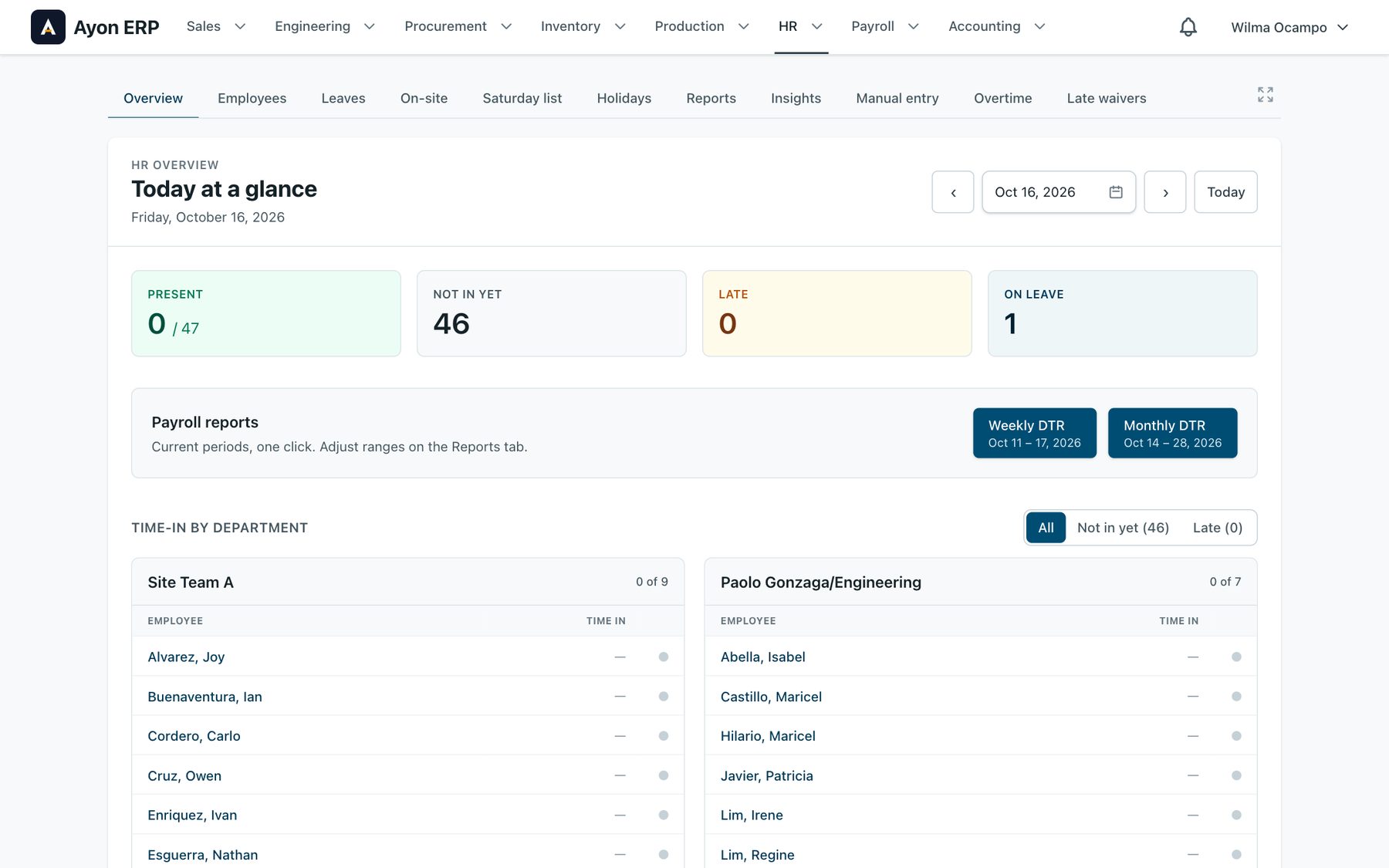
Attendance straight from the biometric devices.
- Today at a glance: present, not in yet, late, on leave
- Attendance health, late arrivals, perfect attendance
- Leaves filed and approved, paid or unpaid
- Overtime read from the Viber group chat
- Holidays, Saturday list, late waivers, on-site work
- My HR: staff see their own leave, attendance and payslips
Payroll
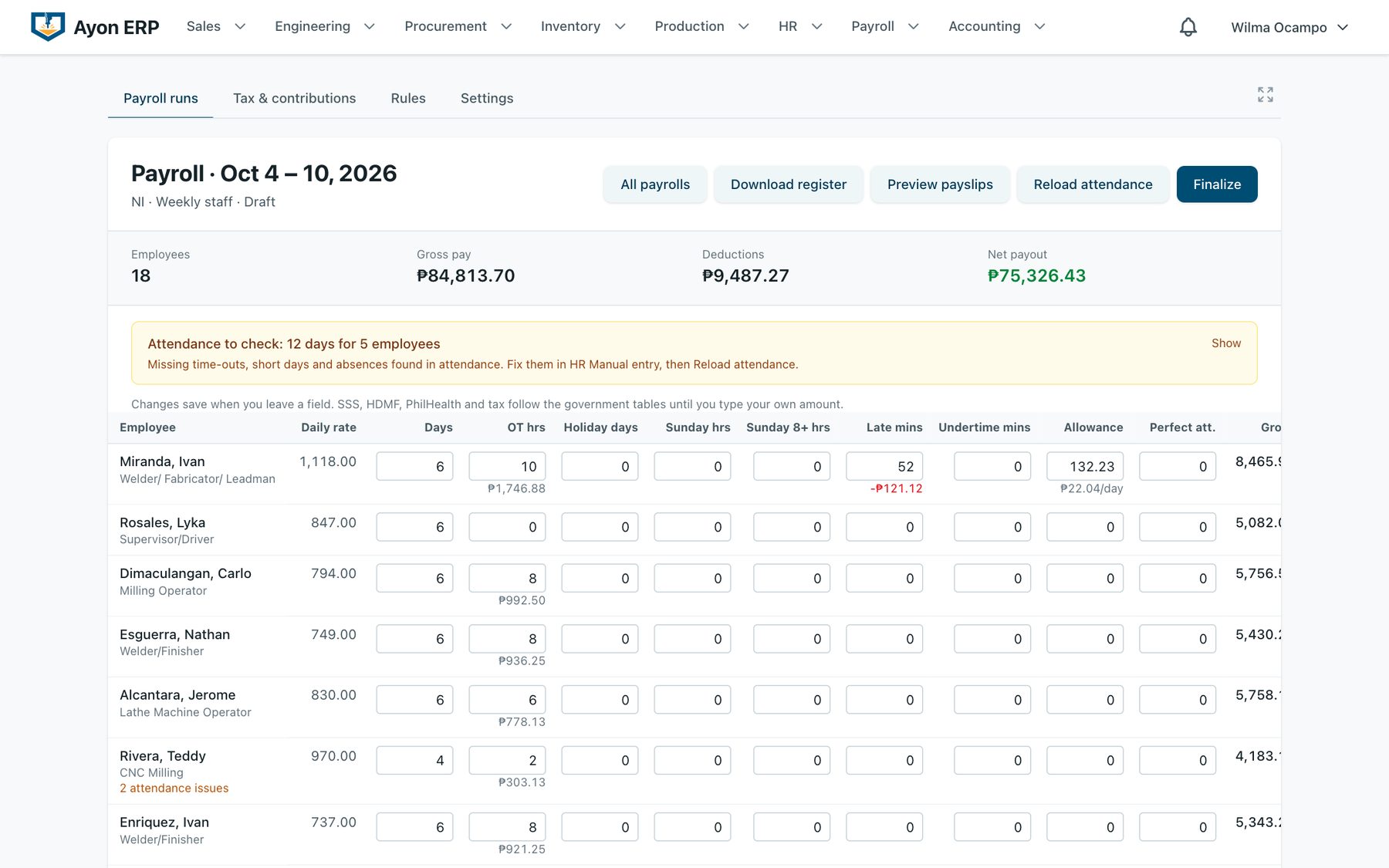
Computed from attendance, approved leaves and overtime.
- Weekly and semi-monthly runs per employer
- Missing punches flagged before HR finalizes
- Holiday and overtime rates you can edit
- Payslips, payroll register, SSS, PhilHealth, Pag-IBIG and withholding tax
Accounting
What came in, what went out, and what can be chased now.
- Receivables per sales order, with withholding tax
- Sales invoices and collections: downpayment, progress billing, retention
- Check vouchers and petty cash
- Cash disbursement journal, chart of accounts, budget tracker
- Payment-proof photos from the group chat, matched to a customer
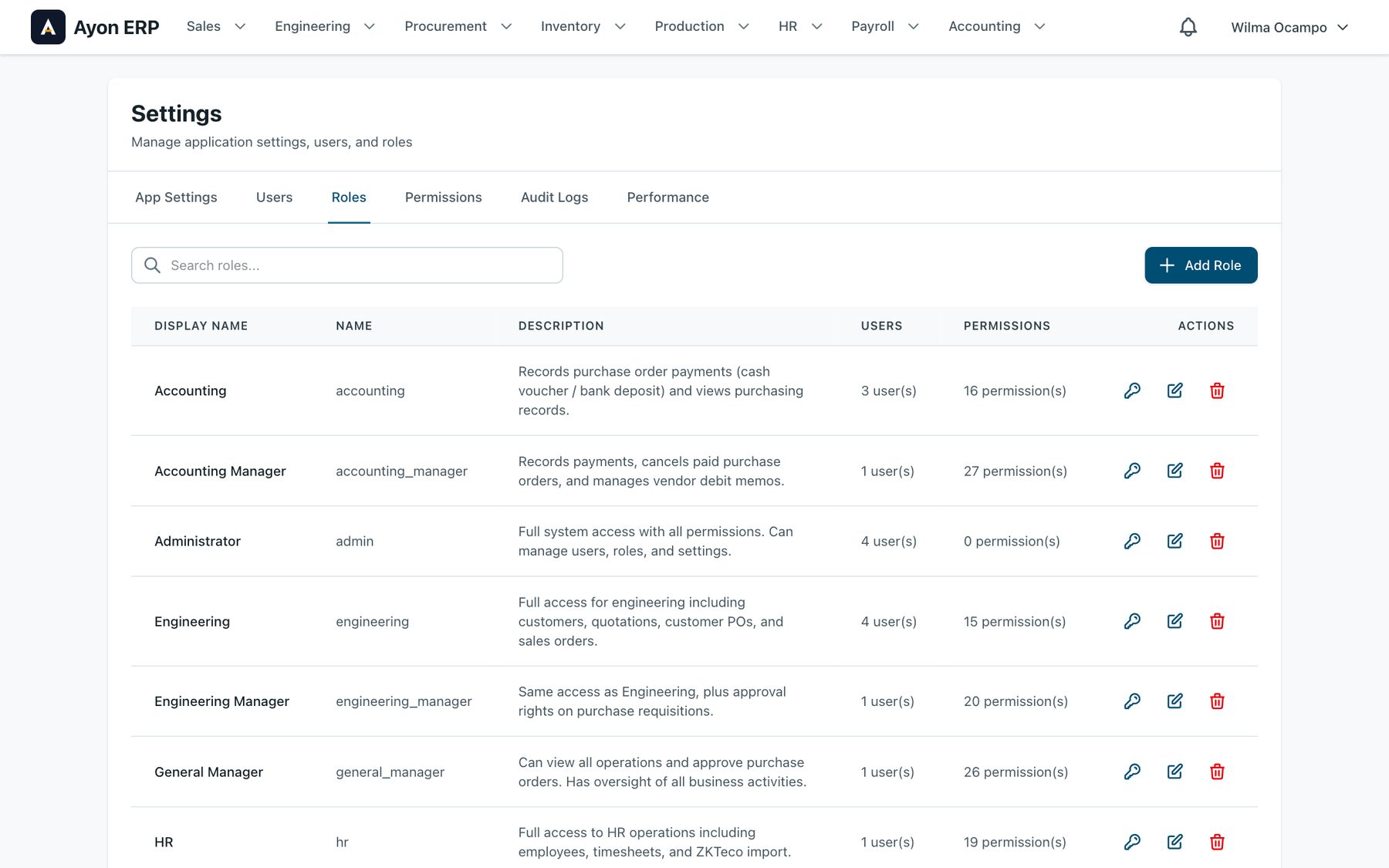
Administration
Locked down by role. Every change has a name on it.
- 15 roles built from 84 permissions, deny by default
- Single sign-on with the company’s Microsoft accounts
- Change history: who changed what, and when
- Print headers, terms and logos per company
- Alerts by Viber, email and the in-app bell, per person
- A wall TV board for the shop floor
How It’s Run
Staff message us in the group chat when something is off. Most fixes ship the same day.
Its own installation
Ayon runs on its own installation for the client. Their data never shares a database with anyone else’s.
Backed up every day
Daily container snapshots and a nightly database copy. A backup is taken before any change that touches existing data.
Tested before it ships
265 automated test files run on every change. A smoke check loads the app and the login after each deploy.
Fast where it matters
Median page response of 353 ms over a week of 10,915 requests, with no server errors. The slowest canvass went from 37.9 seconds to 0.56.
Changes in plain language
Every release is listed inside the app under What’s New, written for the people who use it.
Nothing locked in
PostgreSQL underneath, exports to CSV and Excel. The data is the client’s, in formats anyone can read.
Technical Architecture
Ayon is one codebase with 15 roles built from 84 permissions, deny by default. More than 1,900 commits since November 2025, with 265 test files run on every change.
- Backend: Laravel 12.x (PHP 8.2+)
- Frontend: Livewire 3.x, Tailwind CSS, Reverb for live updates
- Database: PostgreSQL
- Phone apps: Installable web apps that work offline
- Sign-in: Single sign-on with the company’s Microsoft accounts
- Hosting: Its own Docker installation, backed up daily
Questions We Get
Can we buy Ayon?
No. Ayon was built for one company and isn’t for resale. If your shop has the same kind of problems, we build a system around how you work, and we bring what we learned building Ayon.
How long did it take?
We started in November 2025. Purchasing came first because that’s where most of the time went. The whole office has used it every day since August 2026, and it keeps getting better from what the staff report.
Did they have to change how they work?
As little as possible. Staff already sent overtime requests in a Viber group, so Ayon reads the group. Item descriptions were written a certain way, so Ayon reads the grade and size from the text. The system fits the shop, not the other way around.
What happened to the old records?
We imported years of spreadsheets: over 4,000 suppliers, quotations, purchase orders, and the warehouse notebook from photos of its pages.
Does it handle VAT and government reports?
Quotes and POs can be VAT inclusive or exclusive; customers and vendors carry their tax type, and receivables track withholding tax. Payroll produces SSS, PhilHealth, Pag-IBIG and withholding tax reports.
Do you use AI?
We use AI tools when writing code, so building is fast. The hard part is understanding how the business runs. Inside Ayon, the features that read photos or messages are optional and can run on a private model.
What happens when something breaks?
Staff message us directly. Every fix goes to a test copy first and must pass the automated tests before it reaches production. Most fixes ship the same day.
Related Articles
Running on spreadsheets and chat?
Ayon was built for one company and isn’t for resale. If your operations have the same gaps, we’ll look at how you work today and build the system around it.
Get in Touch